
The 5 Best AI Sticker Printers of 2026
We tested a wide range of children’s AI sticker printers and selected five models for this guide.

Marta Ferreira
Marta is a technology reviewer who assessed children’s AI sticker printers, focusing on how each model creates prints, its controls, paper options and suitability for everyday craft activities.
marta@weselect.org
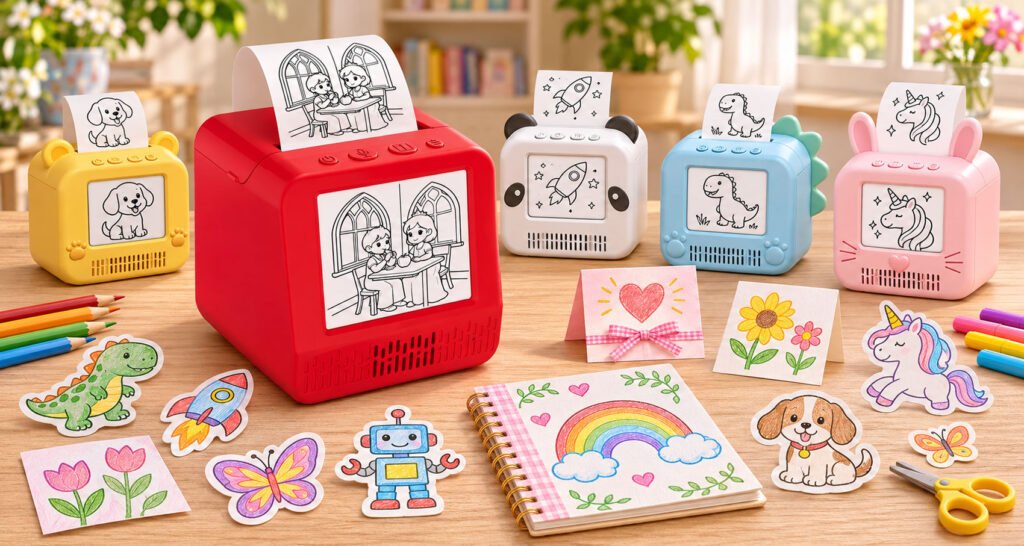
Children’s AI sticker printers offer different ways to bring ideas onto paper. Some use AI to turn a spoken prompt into a new illustration; others are thermal camera printers that produce black-and-white versions of photos or built-in activity designs. After testing a wide range of products, we selected five child-focused printers for this guide. Our first pick, the Powerixo AI Mini Printer, is designed around voice-to-picture creation, an on-screen preview and prints children can colour.
We assessed each printer on 9 practical criteria:
- Whether it creates new AI artwork or prints photos and templates
- Thermal printing method, resolution and black-and-white output
- Screen preview, voice input or camera controls
- Creative styles, filters, templates and craft features
- Setup steps, app requirements and connectivity
- Compatible paper formats, including adhesive options
- Portability, battery life and charging
- Ease of use for children and family craft activities
- Included paper, accessories and refill availability
4 Reasons Families Enjoy Voice-to-Picture Printing
Turn Spoken Ideas into Pictures
Children can describe a simple idea and turn it into a printable picture. The AI Mini Printer supports voice input in 20 languages and does not require an app download for this creative workflow.
Preview Designs Before Printing
A 2.8-inch IPS HD screen shows the design before printing. The preview matches the artwork printed on the paper, so children can see what they are about to make.
Print Without Ink Cartridges
Inkless thermal printing produces black-and-white outlines without ink cartridges. Children can add colour afterwards with pens or use the print as part of a craft project.
Make Each Picture Your Own
Choose from eight visual styles, including 2D cartoon, cute, crayon, storybook illustration, hand-drawn doodles, low-poly 3D, 3D cartoon and line art. Printed designs can become colouring pages, stickers, card decorations or storybook details.
The Best AI Sticker Printer for Kids in 2026
After testing a wide range of children’s thermal printers, we selected five models for this guide. We assessed their print quality and paper options, creative features, ease of use and everyday practicality.
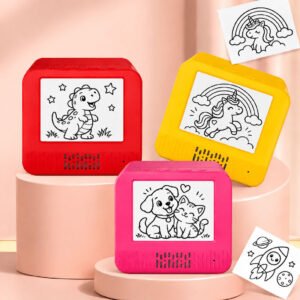
Our top pick, the Powerixo AI Sticker Printer, turns spoken ideas into pictures children can preview, print and colour. With eight creative styles, paper rolls and coloured pens included, it makes a thoughtful gift for young artists who enjoy drawing and hands-on crafts.


485 votes · 9.9/10
AU$159
A+
Creation Method
Print Method & Paper
Creative Features
Controls & Everyday Use
Value for money
Pros
- Turn spoken ideas into printable AI illustrations in 20 languages
- Preview designs on the 2.8-inch IPS screen (240 × 320 pixels)
- Explore eight creative styles for drawings, stickers and crafts
- Print black-and-white designs without ink cartridges
- Make personalised stickers with compatible adhesive thermal paper
- Includes standard and adhesive paper rolls, plus six coloured pens
- Compact 185 g design with rechargeable USB-C battery
- Use four clearly arranged controls for power, voice input, mode selection and printing
- The perfect gift: an excellent present for creative children, budding artists, and curious explorers.
Cons
- Available online only
Review
The Powerixo AI Sticker Printer is designed for children who enjoy drawing, making stickers and turning imaginative ideas into hands-on projects. Instead of simply printing an existing picture, it lets children describe what they want to create and generate a new illustration.
From spoken idea to printable picture
Children can use voice input to describe a character, animal or scene. The printer supports 20 languages and offers eight creative styles, including cartoon, storybook, crayon and line art. Its 2.8-inch IPS display makes it possible to preview the artwork before printing.
Creative projects beyond stickers
The printer uses 200 DPI thermal printing to produce black-and-white outlines without ink cartridges. Children can colour their pictures, decorate greeting cards, create storybook pages or use compatible adhesive paper to make personalised stickers.
Useful accessories included
The package includes a 5 m roll of standard thermal paper, a 3 m roll of adhesive paper and six coloured pens. These accessories allow children to explore several creative activities without needing to buy the basic craft materials separately.
Compact and rechargeable
Weighing approximately 185 g, the printer is easy to move around the home. Its 1,200 mAh battery provides an estimated three to four hours of use, and USB-C charging takes approximately two hours.
Who should consider it?
The Powerixo is particularly worth considering for families looking for a creative gift that combines AI-generated illustrations, printing and colouring. Parents looking primarily for colour photo printing or an office label printer should consider a different type of device.


391 votes · 9.4/10
A$264
A
Creation Method
Print Method & Paper
Creative Features
Controls & Everyday Use
Value for money
Pros
- Turns spoken ideas into sticker-style illustrations
- Screen-free creative use with press-to-talk voice input
- 203 DPI black-and-white thermal printing
- Designed for stickers, labels, lunch-box tags and crafts
- Companion app offers additional templates and printing tools
Cons
- The manufacturer describes direct voice printing as usable without a phone; extra app features are also available.
- Voice input is activated for the interaction rather than listening continuously in the background.
- Prints are monochrome and can be coloured by hand.
Review
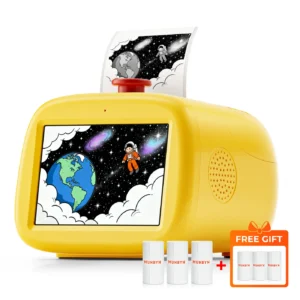
This voice-controlled thermal sticker printer turns spoken ideas into black-and-white designs children can print, colour and use for crafts, labels or little rewards. Its screen-free design keeps the experience focused on speaking and creating. According to the manufacturer, the microphone does not listen continuously in the background.
Printing at 203 DPI, it supports Wi-Fi and Bluetooth. Children can create and print directly from the device, while a companion app provides additional templates and printing tools. Thermal printing means no ink or toner cartridges are needed. Printed outlines can be used as they are or personalised with coloured pens.


323 votes · 9.0/10
A$243
A-
Creation Method
Print Method & Paper
Creative Features
Controls & Everyday Use
Value for money
Pros
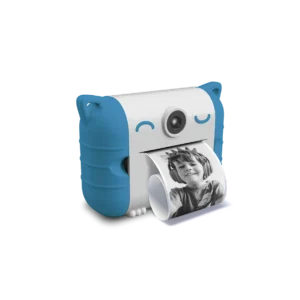
- Combines a child-friendly digital camera with a thermal printer
- Prints black-and-white photos, panoramic shots and activity pages
- More than 100 customisable templates and 40+ photo effects
- Includes comic-strip tools and three built-in video games
- Parental controls can set daily play and printing limits
Cons
- This is a camera printer: it prints captured photos and templates rather than creating pictures from voice prompts.
- VTech lists thermal paper refills separately.
- The product is designed for children aged 4 and over.
Review
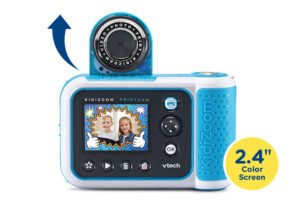
This children’s digital camera combines photo-taking with ink-free thermal printing. Kids can take photos or selfies, add effects and frames, then print black-and-white versions. It also offers standard and panoramic formats, more than 100 customisable templates, comic-strip layouts and printable games to colour in.
A 2.4-inch colour screen lets children preview photos, while the flip-up lens makes selfies easier. The included thermal paper roll is rated for up to 80 prints. Three built-in video games and parental controls for daily playtime and printing limits add extra flexibility. It is designed for capturing and decorating photos or using templates; it does not create new drawings from spoken prompts.


292 votes · 8.5/10
A$259
B+
Creation Method
Print Method & Paper
Creative Features
Controls & Everyday Use
Value for money
Pros
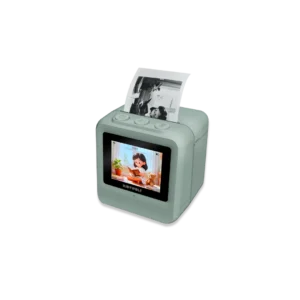
- A child-friendly camera with an integrated thermal printer
- Prints black-and-white photos without ink cartridges
- 21 filters for personalising captured images
- Includes up to 180 prints and several paper options
- USB-C charging and microSD support for saved photos
Cons
- The camera saves photos in colour, while thermal printouts are black and white.
- This model prints photos taken with the camera; it is not a voice-to-image AI printer.
- KIDYWOLF recommends it for children aged 5 and over.
Review
This children’s camera features a built-in thermal printer for capturing photos, selfies and videos, then printing selected images in black and white without ink or cartridges. With 21 filters, children can personalise their pictures for keepsakes, journals and craft projects.
It has an 8 MP selfie camera, a 2.4-inch colour screen and a microSD card slot that supports cards up to 32 GB (card sold separately). The box includes thermal paper for up to 180 prints, magnetic photo frames, stickers, a shoulder strap, a USB-C cable and a manual. Photos can be saved in colour, while thermal prints are monochrome. Recommended for children aged 5 and over.


236 votes · 8.0/10
A$226
B
Creation Method
Print Method & Paper
Creative Features
Controls & Everyday Use
Value for money
Pros
- Voice prompts become printable illustrations
- Six creative modes, including cartoon, sketch and line art
- Black-and-white thermal output without ink cartridges
- 21 supported languages and child-friendly content filtering
- Includes a paper roll for about 70 prints, four markers and a USB-C cable
Cons
- The Tiny Print app and wireless connection are part of the setup.
- The built-in content filter blocks unsuitable or sensitive prompts.
- The manufacturer recommends the printer for children aged 6 and over.
Review
This children’s voice-to-image thermal printer turns spoken ideas into illustrations that can be printed in black and white, then coloured, cut out or used in collages. It offers six creative modes—cartoon, sketch, ink painting, line art, simple drawing and anime—and voice interaction in 21 languages.
The printer connects via Bluetooth and Wi-Fi and works with a companion app. The microphone activates when the child presses and holds the button, and the manufacturer says unsuitable or sensitive requests are filtered. The box includes a thermal paper roll for around 70 prints, four colouring markers, a rechargeable battery, a USB-C cable and a user manual. Recommended for children aged 6 and over.
What to Look For
Choose the Creative Workflow
AI drawing printers create new illustrations from spoken ideas, while children’s thermal camera printers turn photos or templates into compact black-and-white prints. Think about whether your child would enjoy inventing a picture, capturing a moment, or using both types of activity.
Check the Print and Paper Format
Check the supported paper width and roll type before buying. Standard thermal paper suits colouring and notes; adhesive rolls can be useful for sticker projects. The included roll length and print count vary by model and design.
Look at the Built-In Creative Tools
Creative features differ: some devices generate images from voice prompts, while camera printers offer filters, frames, templates or printable games. Check which functions work directly on the printer and whether any extra features need a phone or companion app.
Consider Setup and Connectivity
Confirm the compatible thermal paper format and whether the printer supports standard or adhesive rolls. Check what is included in the box, as additional paper and accessories may be sold separately.
Plan for Everyday Craft Use
Check whether the printer works through on-device voice or camera controls, or needs a phone, app, Wi-Fi or Bluetooth. For a shared craft table, also consider its size, weight, buttons and charging method.
What to Check Before Choosing
- Whether your child wants to generate pictures or print photos and templates
- The print format and compatible thermal paper rolls
- Whether a phone, app, Wi-Fi or Bluetooth is needed
- Available creative modes, filters and personalisation options
- What paper and accessories are included in the box